
 Key Type Key Type | Retail Key |
|---|---|
 Region Region | Global |
This SQL Server 2019 Standard key installs the Standard edition of Microsoft’s database server on Windows or Windows Server. You enter it during setup, and it’s a one-time purchase with no subscription. The key is emailed right after payment.
What’s in SQL Server 2019 Standard
- Intelligent Query Processing, which speeds up many queries without code changes.
- Accelerated Database Recovery for much faster rollback and restart.
- UTF-8 support, and Always Encrypted for protecting sensitive columns.
- Standard edition limits: up to 24 cores or 4 sockets, and 128 GB of memory for the buffer pool.
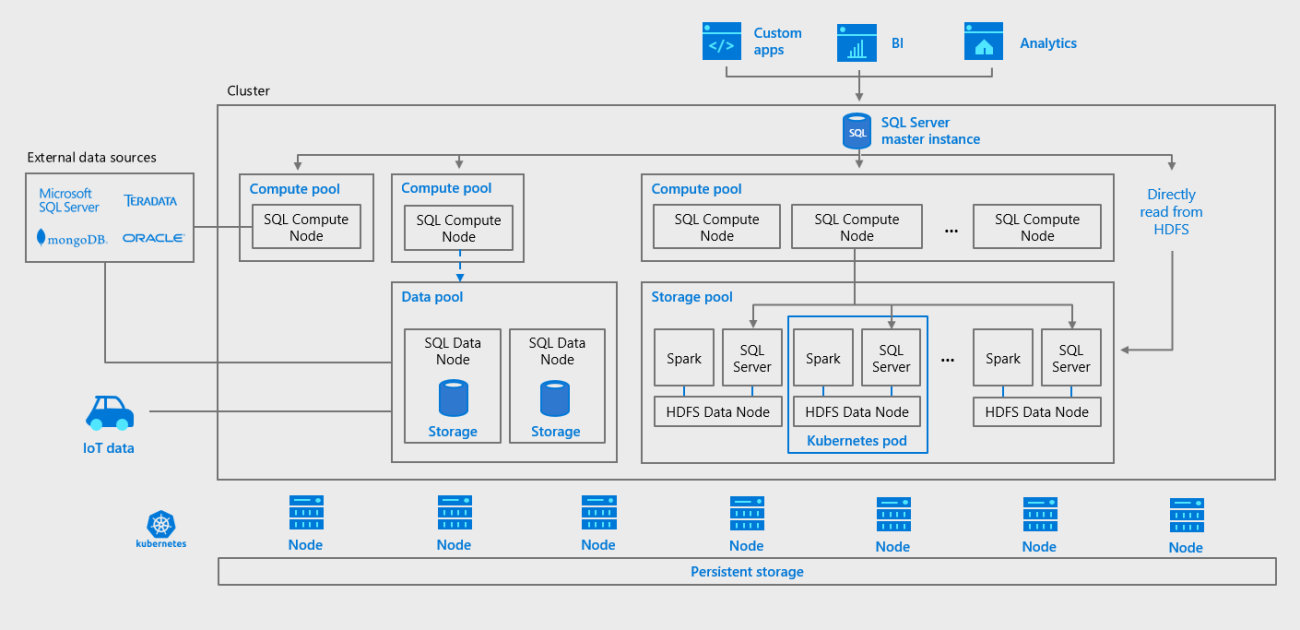
Standard suits departmental and small-business databases. Larger systems that need more cores or memory need Enterprise.
What you get
Your SQL Server 2019 Standard product key, emailed right after payment. You enter it during SQL Server setup to install the Standard edition. It’s a one-time purchase with no subscription.
SQL Server 2019 Standard key price
Microsoft now sells SQL Server 2022. Here are its Standard edition list prices next to ours:
| Seller | What you get | Price |
|---|---|---|
| Microsoft (US list price) | SQL Server 2022 Standard, per core: 2-core pack | $3,945 |
| Microsoft (US list price) | SQL Server 2022 Standard, per server; each user or device also needs a $230 client access license (CAL) | $989 |
| GGKeys | SQL Server 2019 Standard key, emailed after payment | $227 |
Microsoft’s prices are from its SQL Server 2022 pricing page. Our price is shown in your currency, as a one-time payment.
How to install SQL Server 2019 Standard
- Download the SQL Server 2019 installer from Microsoft and run Setup.
- Choose New SQL Server stand-alone installation.
- On the Product Key page, enter the key from your order email. It unlocks the Standard edition; then finish the setup wizard.
Full walkthrough: SQL Server installation and activation guide.
System requirements
| Requirement | Details |
|---|---|
| Operating System | Windows Server 2016, 2019, 2022 or 2025; Windows 10 or Windows 11 |
| Processor | x64 processor, 1.4 GHz minimum; 2.0 GHz or faster recommended |
| Memory | 1 GB minimum; at least 4 GB recommended, more as your databases grow |
| Hard Disk Space | Minimum: 6 GB of available hard-disk space |
| Network software | Built into supported Windows versions (Shared memory, Named Pipes and TCP/IP) |
| .NET Framework | Included in the supported Windows versions |
| Display | Super VGA (800×600) or higher resolution monitor |
SQL Server 2019 Standard key FAQ
Does SQL Server need online activation?
No. The key you enter in SQL Server Setup unlocks the Standard edition; there’s no separate activation step.
I already installed the Evaluation or Developer edition. Can I use this key?
Yes. Run SQL Server Setup, choose Maintenance → Edition Upgrade, and enter the key.
How does Microsoft license SQL Server Standard?
Per core, or per server with a client access license (CAL) for each user or device that connects. Make sure your setup matches Microsoft’s licensing terms.
How much does a SQL Server 2019 Standard key cost?
Microsoft’s list price for its current SQL Server 2022 Standard is $3,945 per 2-core pack, or $989 per server plus $230 per CAL. A SQL Server 2019 Standard key from GGKeys costs $227, a one-time payment with no subscription.
Are cheap SQL Server keys legit?
Some are and some aren’t, so check the seller first: a registered company, a stated license type, and a replacement or refund if the key doesn’t work. GGKeys is run by GGKEYS LTD, a company registered in Bulgaria, in the EU. Our SQL Server keys are genuine Retail keys, and if one doesn’t work, we fix it or refund you within 14 days. You can read our customer reviews on Trustpilot.
Is SQL Server 2019 still supported?
Yes, with security updates until 8 January 2030. Mainstream support ended in February 2025.
How fast will I get my key?
By email, right after payment. If it hasn’t arrived within a few minutes, check your spam folder, then contact us.
What if my key doesn’t work?
Contact our support within 14 days with your order number, as described in our refund policy. We’ll fix the problem or replace the key, and if no working solution is possible, we’ll refund you.
 Overview
| Client | Microsoft |
|---|---|
| Key Type | Retail Key |
| Language | Multilingual |
 Platform Platform | PC |
| Publisher | Microsoft |
| Region | Global |
| Release Date | November 4, 2019 |
| Activation | Enter the key in SQL Server Setup |
Discounted Games


Anno 117: Pax Romana
Price range: $63 through $91
ARC Raiders
Price range: $46 through $69

Battlefield 6
Price range: $74 through $103
Broken Arrow (Steam)
Price range: $46 through $54More Like This


Reviews
Clear filtersThere are no reviews yet.